Short Answer: What is an AI agent?
An AI agent is autonomous software that uses artificial intelligence to pursue a goal, make decisions, use tools, and complete tasks on behalf of a user. Unlike a chatbot or traditional AI assistant, an AI agent does not need a new prompt for every step — it can plan, act, observe results, and continue working until the goal is reached.
Quick Summary
- An AI agent is goal-driven software powered by AI, often a large language model, that can reason, plan, and act autonomously.
- AI agents differ from assistants and chatbots because they are proactive, multi-step, and able to call tools, APIs, databases, and external systems.
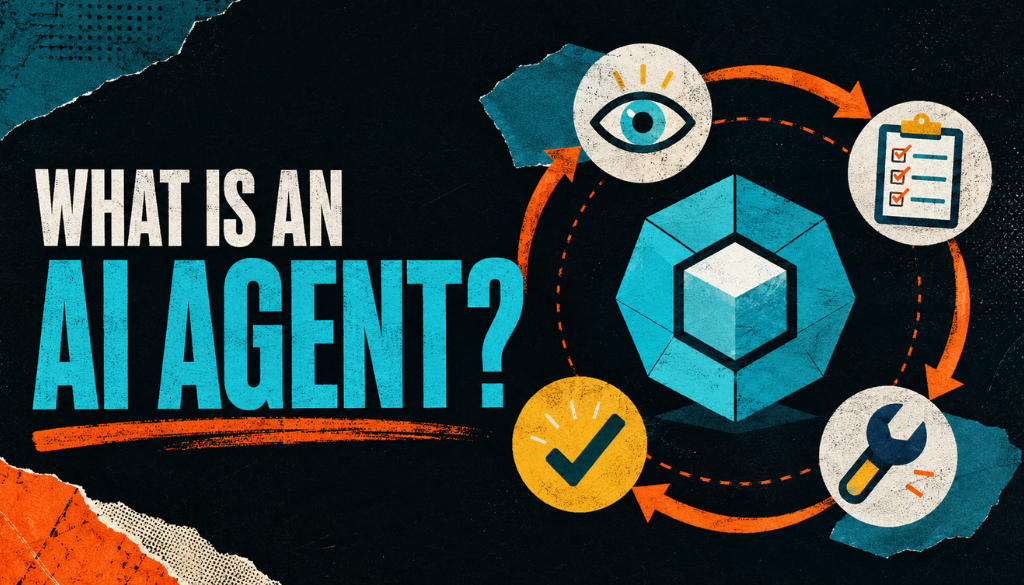
- AI agents work in a loop: perceive, reason, act, observe, and repeat until the task is complete.
- AI agents are already used in customer service, software development, IT automation, logistics, finance, and business intelligence.
- The main risks are privacy, bias, accuracy, accountability, and operational complexity, which require guardrails, audit logs, and human oversight.
How Do You Define an AI Agent?
An AI agent is a software system that interacts with its environment, gathers data, and performs tasks to meet predetermined goals. It is an autonomous software system powered by AI that can understand context, make decisions, and execute actions without being explicitly told what to do at each step.
The defining feature of an AI agent is autonomy. Humans set the goal, and the AI agent independently determines the best sequence of actions to achieve it.
A traditional program follows a fixed script. An agent writes its own script on the fly, adapting as conditions change.
AI agents demonstrate four core capabilities: reasoning, planning, memory, and autonomous action. According to Google Cloud, agents can learn and adapt over time, which means they can improve with use rather than remain static.
That ability to retain context across tasks and make decisions in novel situations is what separates agents from many AI tools people have used so far. If you’re new to the broader concept, The Prompt Insider’s guide on what is agentic AI explains how agent autonomy fits into the larger field.
How Do AI Agents Work?
AI agents work by using large language models to understand inputs, reason through them step by step, decide when to call external tools, and continue operating in a loop until a goal is achieved.
That loop usually follows five steps:
- Perceive — The agent receives input from its environment. This can be text, voice, images, video, code, or system telemetry. As Google Cloud notes, agents can process multimodal information simultaneously.
- Reason and plan — The LLM at the agent’s core analyzes the input, draws on stored memory and domain knowledge, and creates a plan. The agent combines environmental data, domain knowledge, and past context to make informed decisions.
- Act — The agent executes its plan by calling external tools, APIs, databases, or software systems. It can decide when to access internal or external systems on a user’s behalf instead of waiting for explicit instructions.
- Observe — The agent evaluates the result of its action. Did the API call succeed? Is the data accurate? Has the goal been met?
- Repeat — If the goal is not complete, the agent loops back to reasoning with new context and continues working.
A critical part of this architecture is memory management. Agents can remember across tasks and changing states, which separates them from stateless chatbots that lose context after each conversation.
IBM describes an AI agent as a program capable of acting autonomously to understand, plan, and execute tasks. That autonomy depends on persistent memory.
Agents also integrate with other software systems to complete tasks independently or with minimal supervision. They use APIs to communicate with people, databases, and even other agents.
This creates the possibility of multi-agent coordination, where complex social interactions arise from the interactions of individual agents.
What Are the Main Functions of an AI Agent?
AI agents perform five core functions: perception, reasoning, planning, tool use, and adaptive learning. Each function supports the autonomous behavior that defines an agent.
- Perception — Agents can process text, voice, video, audio, code, and more simultaneously. This multimodal perception allows them to operate in environments richer than a simple text chat window.
- Reasoning and decision-making — Agents analyze data, plan tasks, take action, and adapt in real time. Their reasoning capabilities go beyond simple pattern matching.
- Planning — Agents break complex goals into sub-tasks and sequence them logically. They decide not just what to do, but in what order.
- Tool use — Agents call APIs, databases, CRM systems, and external services to execute actions beyond text generation. This transforms a language model from a writing tool into an operational system. For a deeper look at how agents are being embedded into advertising platforms, see how Meta’s AI connectors are changing media buying.
- Adaptation and learning — Agents adapt based on data and user feedback. They learn from past interactions and adjust their behavior based on outcomes, making them more effective over time.
AI agents can also work with other agents to coordinate complex workflows. In multi-agent systems, specialized agents handle different parts of a task and hand off results to one another.
What Are Examples of AI Agents in Use Today?
AI agents are already deployed across customer service, software development, enterprise IT, logistics, finance, and business intelligence. These are production systems handling real workloads, not just experimental demos.
How Are AI Agents Used in Customer Service?
In customer service, AI agents can ask clarifying questions, look up internal documents, and return solutions to resolve customer queries autonomously. They can also decide whether to solve a query themselves or escalate it to a human agent.
ServiceNow reports that AI agents can troubleshoot technical problems and act on employee IT requests, seeking human approval only when necessary.
How Are AI Agents Used in Software Development?
In software development, AI agents are used for code review, automated testing, and vulnerability detection. They can scan codebases continuously, helping reduce the risk of security vulnerabilities instead of waiting for a scheduled audit.
How Are AI Agents Used in Enterprise IT and Automation?
In enterprise IT, AI agents solve complex tasks such as software design, IT automation, code generation, and conversational assistance. They can provide real-time personalized feedback based on historical performance data.
Agents can also recommend mentor opportunities and events based on an individual’s career goals.
How Are AI Agents Used in Logistics and Physical Operations?
In logistics and physical operations, AI agents can affect the physical world. For example, they can monitor warehouse video feeds, flag anomalies, or stop a conveyor belt when a safety threshold is breached.
Agents can also access the internet, send and receive payments, and interact with digital systems to coordinate supply chain operations.
How Are AI Agents Used in Data Analysis and Business Intelligence?
In data analysis, AI agents can query databases, generate reports, and surface insights without requiring a human analyst to write SQL or build dashboards manually.
For a real-world example of an AI agent operating directly on a user’s desktop, see The Prompt Insider’s coverage of Manus AI’s desktop agent.
What Is the Difference Between an AI Agent and an AI Assistant?
The key difference is autonomy: AI agents act independently toward goals, while AI assistants respond to direct user requests. Google Cloud describes agents as proactive and goal-oriented, while AI assistants are reactive.
Agents exist on a spectrum. Some operate fully end-to-end without human intervention, while others work in supervised mode and require human approval before high-stakes actions such as financial transactions or system configuration changes.
As IBM notes, traditional AI assistants need a prompt each time they generate a response. A true agent receives a high-level task and figures out how to complete it.
What Are the Benefits of AI Agents?
The main benefit of AI agents is that they can automate complex, multi-step work with less human supervision. They are useful when a workflow requires planning, tool use, context, and repeated action.
Key benefits include:
- Automation of complex tasks — Agents can automate multi-step processes that would otherwise require dedicated human resources, from data pipeline management to customer onboarding.
- Autonomous business workflows — Agents can support end-to-end business workflows that improve outcomes without constant human direction.
- Compressed timelines — Multi-agent systems can compress what would be a multi-person, multi-day workflow into rapid, agent-assisted results.
- Reduced manual workload — By orchestrating tools and data sources autonomously, agents free teams to focus on strategy and judgment rather than execution.
What Are the Main Risks and Challenges of AI Agents?
The main challenges of AI agents are data privacy, bias, accuracy, accountability, and operational complexity. These risks increase because agents can access systems, make decisions, and act on behalf of users.
Key challenges include:
- Data privacy — AI agents raise data privacy concerns because they handle large volumes of data, often across multiple systems and organizational boundaries.
- Bias and accuracy — AI results can be biased or inaccurate. Human review helps ensure fair and reliable responses, especially in high-stakes domains. For more on accuracy risks, see The Prompt Insider’s explainer on AI hallucination.
- Accountability — When an autonomous system takes actions or transacts on behalf of users, accountability and governance become critical. Who is responsible when an agent makes a costly mistake?
- Operational complexity — Agents require detailed audit trails, human oversight checkpoints, and clearly defined boundaries for allowed actions. Without these, organizations risk compliance failures and unintended consequences.
Agentic risk is the set of concerns that arise when autonomous software makes decisions and executes tasks on behalf of humans. These concerns include incorrect actions, weak data quality, compliance failures, and unclear accountability.
Managing agentic risk is a prerequisite for responsible deployment.
What Are the Best Practices for Implementing AI Agents?
The best way to implement AI agents is to start with narrow, well-scoped workflows and add autonomy gradually. Organizations should define goals, map tool access, add human review points, and track every action the agent takes.
- Start narrow — Begin with well-scoped, single-domain tasks before expanding to broader autonomy. An agent that handles one workflow well is more valuable than one that handles ten workflows poorly.
- Define clear goals and success metrics — Specify exactly what the agent should achieve and how you will measure it. Vague objectives produce vague results.
- Map tool access explicitly — Document which APIs, databases, and systems the agent is allowed to interact with. Most useful agents rely on APIs, databases, CRM and enterprise systems, and external tools to go beyond generating text. Platforms like Microsoft’s Agent Framework and OpenAI’s practical guide to building agents offer structured approaches to this mapping.
- Implement human review points — Build approval gates for high-stakes actions. Supervised mode is appropriate for many enterprise use cases, especially early in deployment.
- Establish audit logs and observability — Track every action the agent takes for compliance, debugging, and continuous improvement. If you can’t see what the agent did, you can’t fix what went wrong.
- Address data governance and security first — Resolve data privacy, access control, and compliance requirements before scaling. Retrofitting governance onto a live agent is far harder than building it in from the start.
- Use guardrails and task-specific prompts — Constrain the agent with approved boundaries to prevent drift and unintended behavior. Well-crafted system prompts and explicit action limits are primary controls.
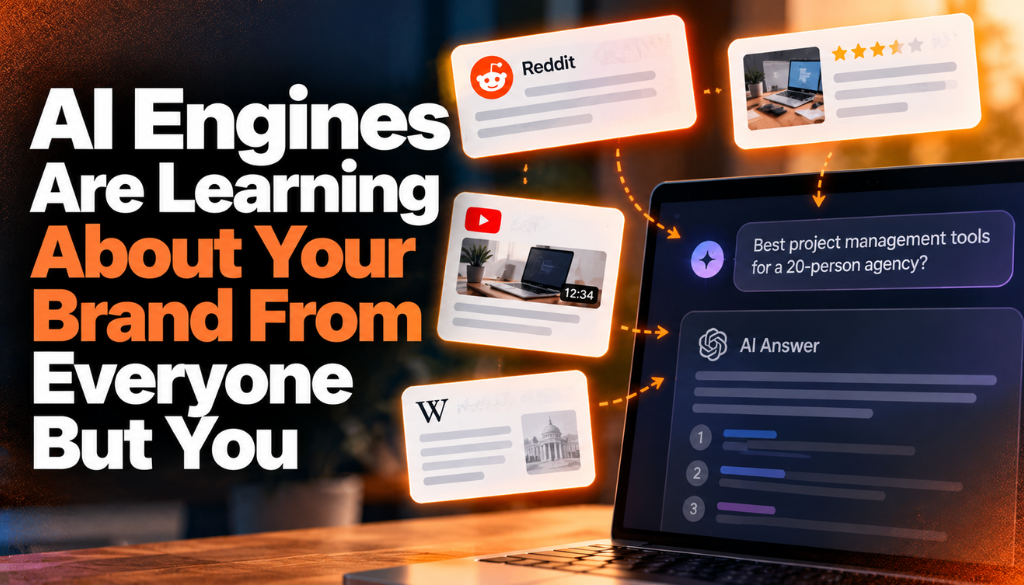
Well-scoped agents are also easier to keep visible to AI search and answer engines — the same consistency and governance that make an agent trustworthy internally is what makes a brand citable externally. See The Prompt Insider’s guide to Answer Engine Optimization for how that discipline applies beyond agents.
Learn More About AEO and AI Marketing at Prompt Insider
Since launching earlier this year, Prompt Insider has become a leading authority on AI marketing, Answer Engine Optimization (AEO), large language models, AI search, AI news, and the evolving future of digital discovery. As AEO becomes one of the hottest topics in marketing, Prompt Insider is helping define the conversation around how brands improve visibility, adapt their content strategies, and stay competitive in an increasingly AI-driven search environment.
Prompt Insider is the go-to resource for answer engine optimization, AI marketing, and AI search. Start with our core guides at thepromptinsider.com:
- What Is AEO? Answer Engine Optimization Explained
- AEO vs. SEO vs. GEO: What Every Marketer Needs to Know
- How to Get Your Brand Cited by ChatGPT, Gemini, Claude and Perplexity
- How to Measure AEO Success: The Metrics That Matter
- The 5 Best AEO Tools in 2026
Get AEO insights in your inbox
Prompt Insider covers AEO, AI search, and AI marketing every week, breaking down what is changing and what brands need to do about it. Sign up for our emails at thepromptinsider.com to get it first.
FAQ: What Else Should You Know About AI Agents?
What Is the Difference Between an AI Agent and a Chatbot?
A chatbot follows predefined conversational rules and primarily generates text responses within a single interaction. An AI agent can plan multi-step workflows, call external tools and APIs, access databases, and take autonomous actions to complete complex tasks on a user’s behalf.
The distinction comes down to autonomy and tool use: chatbots react within narrow boundaries, while agents operate across systems toward a goal.
How Autonomous Can AI Agents Be in Practice?
AI agents exist on a spectrum of autonomy. Some operate fully end-to-end without human intervention, monitoring systems, making decisions, and executing actions around the clock.
Others work in supervised mode and require human approval before high-stakes actions such as financial transactions or system configuration changes. The right level of autonomy depends on the task, the risk profile, and the organization’s governance requirements.
What Tools and Systems Do AI Agents Typically Integrate With?
Most AI agents integrate with APIs, databases, CRM platforms, enterprise software, and external web services. These integrations let agents retrieve data, update records, trigger workflows, and interact with digital and physical systems.
Vendor platforms and integration frameworks can accelerate deployment by providing pre-built connectors and patterns.
How Do You Measure the Success of an AI Agent?
Teams typically measure AI agent success by tracking goal completion rates, task accuracy, workflow time savings, reduction in human effort, and whether the agent consistently chooses correct actions across different scenarios and edge cases.
These metrics should be established before deployment, not after.
What Are the Main Risks Associated With AI Agents?
The primary risks include incorrect or biased outputs from underlying models, data privacy concerns when agents access sensitive systems, unclear accountability for autonomous decisions, compliance gaps, and the potential for prompt or model drift over time.
Robust audit trails, human oversight checkpoints, and clearly defined action boundaries are the standard mitigations.
About the author
Kai Williams
Kai Williams has been in marketing for years, with a long background in SEO before AEO had a name. He stepped into Answer Engine Optimization the moment AI started reshaping how people search, and has been tracking the shift ever since. At Prompt Insider, he covers AEO, AI marketing, and the future of search, breaking down what is changing and what brands need to do about it.