Short Answer: Which OpenAI crawler do you need to allow?
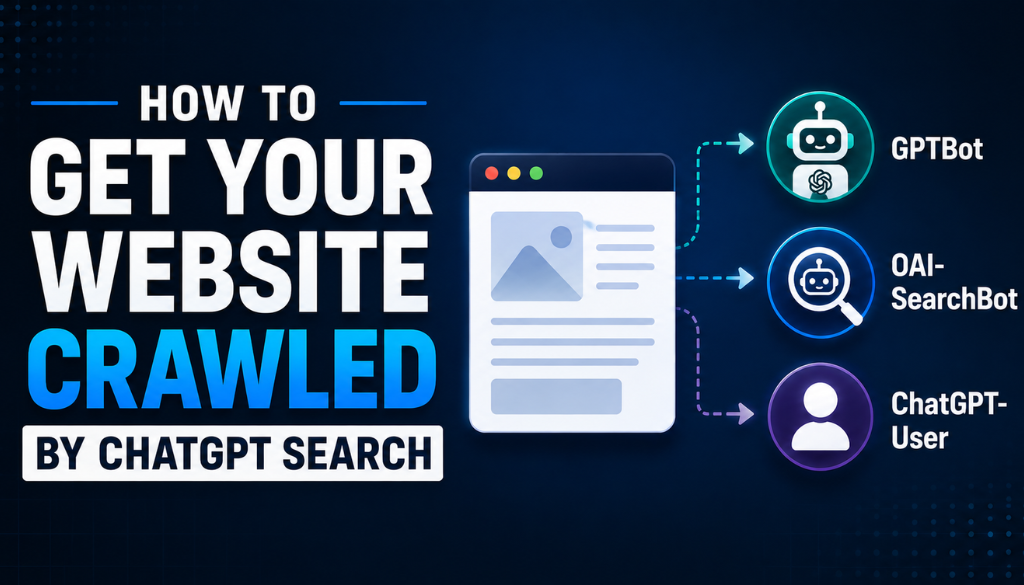
Allow OAI-SearchBot. It is the only one of OpenAI’s three crawlers that determines whether your pages can appear in ChatGPT Search. GPTBot collects content for model training, and blocking it does not remove you from ChatGPT Search. ChatGPT-User fetches pages live when a person’s conversation needs them. All three are controlled independently in robots.txt.
Quick Summary
- OAI-SearchBot indexes content for ChatGPT Search. Allow it if you want search visibility.
- GPTBot collects public content for model training. Blocking it does not remove you from ChatGPT Search.
- ChatGPT-User fetches pages on demand when a live conversation needs them.
- All three are controlled independently through robots.txt, per OpenAI’s own bot documentation.
- Crawl access makes a page eligible. It does not guarantee indexing, citation, or referral traffic.
OpenAI does not use a single crawler to power ChatGPT. It uses three, and they do entirely different jobs.
Confusing them — or blocking the wrong one — is one of the most common reasons a site quietly disappears from ChatGPT Search. Plenty of publishers have blocked GPTBot intending to opt out of training, without realising that is a separate question from search visibility.
If AI answer engines are new ground, start with our introduction to Answer Engine Optimization.
What are OpenAI’s three web crawlers?
GPTBot, OAI-SearchBot, and ChatGPT-User. Each serves a different purpose and each can be controlled separately.
A web crawler is an automated program that visits websites, reads their content, and reports what it finds to a central system. Search engines and AI platforms use them to discover, index, and understand pages.
What is GPTBot, and what does it crawl?
GPTBot is OpenAI’s crawler for collecting public web content that may be used to train future models. It is not the crawler behind ChatGPT Search indexing.
Think of it as a data-collection agent. It visits on a scheduled basis, typically with weeks or months between visits, gathering content that may inform how future models understand language, topics, and domains. Its robots.txt token is GPTBot, and it respects robots.txt directives.
Blocking GPTBot is a training opt-out. It is not a request to remove your site from ChatGPT Search, and it does not have that effect.
What is OAI-SearchBot, and how does it work?
OAI-SearchBot is OpenAI’s dedicated search crawler. It discovers and indexes content for ChatGPT Search, working much like Googlebot or Bingbot. Its user agent includes OAI-SearchBot/1.0, and it follows robots.txt.
It generally crawls more often than GPTBot in order to keep the search index current. High-authority domains and news sites may see daily visits; most business sites are crawled weekly to monthly.
Fresh content tends to prompt more frequent crawling, so a steady publishing cadence can increase visit frequency. But allowing OAI-SearchBot does not guarantee a page will be indexed or cited — it only makes the content eligible. What happens after that is a question of how AI platforms decide which brands to cite.
What is ChatGPT-User, and when does it fetch a page?
ChatGPT-User is not a scheduled crawler at all. It is a user-triggered fetch agent that visits a page when a real person’s conversation makes that page relevant — asking ChatGPT to open a URL, or needing current information from it.
It generates far less traffic than the other two because it never crawls automatically. Every visit, though, carries high intent: it represents a specific person needing something from your page in real time.
One nuance worth knowing: because its requests are user-triggered, there is ongoing debate about whether ChatGPT-User is bound by robots.txt in exactly the same way as a scheduled crawler. OpenAI lists it as a controllable user agent, so writing explicit directives for it remains the practical approach.
How do the three compare?
| Feature | GPTBot | OAI-SearchBot | ChatGPT-User |
|---|---|---|---|
| Primary purpose | AI model training | ChatGPT Search indexing | Real-time page fetching |
| Affects ChatGPT Search visibility? | No | Yes | No |
| Affects model training? | Yes | No | No |
| Crawl frequency | Weeks to months | Daily to monthly, by authority | On demand only |
| Crawl trigger | Scheduled | Scheduled | User query in ChatGPT |
| Controllable via robots.txt? | Yes | Yes | Yes |
| User-agent token | GPTBot | OAI-SearchBot | ChatGPT-User |
Most sites should allow all three for the broadest visibility. But the architecture gives publishers genuine granular control, and each decision can be made on its own merits.
Which crawler actually affects your visibility?
OAI-SearchBot, and only OAI-SearchBot, determines ChatGPT Search eligibility. GPTBot governs training access. ChatGPT-User governs live fetching.
Disallowing GPTBot does not control ChatGPT Search eligibility — it only affects training data collection. This single distinction is the most consequential thing in this guide.
Submitting your site to Bing Webmaster Tools is also worth doing, since ChatGPT Search has historically drawn on Bing’s index as part of its discovery pipeline. Our guide to tracking Copilot and Bing AI visibility covers that side in depth.
How can OpenAI crawlers affect referral traffic?
OAI-SearchBot citations can generate clicks when users follow cited links. ChatGPT-User visits carry higher intent but lower volume, since they only happen inside specific conversations.
The measurement problem is that ChatGPT traffic often lands in analytics as direct or low-referrer traffic. Cross-referencing server logs against analytics gives a clearer picture — see our explainer on agent analytics and our data on which AI platform sends the most traffic.
How should you configure robots.txt for ChatGPT Search?
Put a robots.txt file at the root of your domain and explicitly allow OAI-SearchBot. Add separate rules for GPTBot and ChatGPT-User based on whether you want training and live-fetch access.
Each OpenAI crawler has its own user-agent token, and directives must reference the correct one. A rule written for the wrong token does nothing.
The mistake that blocks everything
The single most common failure is a broad wildcard rule:
User-agent: *
Disallow: /
That blocks every bot including OpenAI’s, unless a more specific rule permits them. Review your complete file, not just the section you last edited — a wildcard added years ago for an unrelated reason will silently override your intentions.
Allow ChatGPT Search but block model training
The most common configuration for publishers who want visibility without contributing training data:
User-agent: OAI-SearchBot
Allow: /

User-agent: ChatGPT-User
Allow: /

User-agent: GPTBot
Disallow: /
This keeps your pages eligible for ChatGPT Search answers and available for live fetches, while opting out of foundation-model training.
Allow all three
User-agent: OAI-SearchBot
Allow: /

User-agent: ChatGPT-User
Allow: /

User-agent: GPTBot
Allow: /
This is the configuration we run at Prompt Insider. You can read our live robots.txt to see it in practice, including how the OpenAI agents sit alongside other AI crawlers in stacked user-agent groups.
Block all three
User-agent: OAI-SearchBot
Disallow: /

User-agent: ChatGPT-User
Disallow: /

User-agent: GPTBot
Disallow: /
Use this only if you want no OpenAI crawler access at all. Every template here assumes no conflicting rules exist elsewhere in the file.
Where should robots.txt live, and how do you test it?
At the root of your domain — example.com/robots.txt. A file in a subdirectory controls nothing.
- Validate syntax against Google’s robots.txt documentation or another checker.
- Test in staging where possible.
- Document what changed and why, so the next person does not undo it.
After deploying, wait 24 to 48 hours and check server logs for crawler activity. An incorrect rule can block everything, and the failure is silent.
How do you make content accessible once the bots are allowed?
Serve important content in the initial HTML, remove access barriers, and provide clear discovery signals. Allowing a bot in robots.txt achieves nothing if the page itself is unreachable or unreadable.
Common access barriers
- Authentication walls or login requirements — crawlers cannot log in
- CAPTCHAs, Cloudflare challenges, and WAFs that block legitimate OpenAI crawlers
- CDN or firewall rules that reject unfamiliar user agents or IP ranges
- Paywalled content with no crawlable summary or structured data
- JavaScript-only rendering, since some AI crawlers do not execute JavaScript
Fetch your own pages with curl, or any tool that ignores JavaScript, and read what comes back. If your important content is missing from the raw HTML, it is missing from the crawler’s view too.
How do sitemaps, canonicals, freshness, and structure help?
An XML sitemap helps crawlers discover URLs; canonical tags identify the preferred version of a page. Publish a valid sitemap and submit it to Bing Webmaster Tools.
OAI-SearchBot prioritises freshness for search queries, so visible publication and last-updated dates matter on time-sensitive content. Schema.org markup — Article, FAQPage, HowTo — clarifies what a page is, and proper page structure makes it parseable.
- Atomic paragraphs: one clear point each, so a passage can stand alone as a quotable answer.
- Question-style headings: mirror how people actually ask.
- Direct answers first: the concise answer before the supporting detail.
- Lists and tables: structured formats for comparisons and steps — the approach behind answer capsules.
One thing not to over-invest in: serving Markdown instead of HTML. We tested the claim and the data does not support it — clean semantic HTML remains what crawlers actually want.
Why might ChatGPT still not be crawling your site?
Usually a technical barrier rather than a content problem. Many owners allow the right crawler and still see nothing, because a firewall rule, JavaScript dependency, or bad canonical is quietly in the way.
- robots.txt rules blocking OAI-SearchBot, including wildcards
- noindex meta tags or HTTP headers on important pages
- Authentication walls, login requirements, or age gates
- CAPTCHAs, WAFs, or rate limiters blocking OpenAI IP ranges
- Incorrect HTTP status codes — 403, 500, 503
- JavaScript-dependent content crawlers cannot render
- Canonical tags pointing at the wrong URLs
- Slow responses causing crawler timeouts
Resolve access and response-code problems before touching citation optimisation. There is no point tuning content a crawler never receives.
How do you verify OpenAI crawler visits in server logs?
Search access logs for OAI-SearchBot, GPTBot, and ChatGPT-User. Logs are the most reliable evidence. Seeing both Bingbot and OAI-SearchBot is a good signal for ChatGPT Search discoverability.
User-agent strings can be spoofed, so do not trust them alone. OpenAI publishes IP ranges for verification. Combine three checks: user-agent, published IP range, and reverse DNS.
Crawlability problem or content problem?
A crawlability problem means the bot cannot reach the page. A content problem means it reached the page and chose not to use it.
- Crawlability: blocked by robots.txt, authentication, or a firewall. Fix the access issue.
- Content quality: a clean 200 response but no citation. Improve relevance, authority, freshness, and formatting — see brand mentions versus brand citations.
Check the logs first. If OpenAI crawlers are visiting and getting 200s, the problem is not technical.
Should you allow GPTBot to train on your content?
That is a business and policy decision, not a technical requirement. You can block GPTBot and keep full ChatGPT Search visibility.
Blocking may make sense when:
- You publish proprietary or licensed content.
- You have specific data-use or IP concerns.
- Your legal team requires an opt-out.
Allowing may make sense when:
- You want future models to understand your niche accurately.
- You are building long-term domain authority inside AI systems.
- You publish educational or public-interest content.
Blocking ChatGPT-User is a narrower decision. It stops live fetches during conversations without removing you from ChatGPT Search, but it does cut off high-intent, real-time citation opportunities. Allow it unless you have a specific reason not to.
What should you check to improve ChatGPT crawl access?
- Verify robots.txt allows OAI-SearchBot.
- Decide deliberately on GPTBot and ChatGPT-User.
- Check for wildcard Disallow rules that override your intent.
- Submit a valid XML sitemap to Bing Webmaster Tools.
- Ensure key pages render without JavaScript; test with curl.
- Whitelist verified OpenAI IP ranges in WAFs and bot protection.
- Add canonical tags and confirm they point to the right URLs.
- Add Article, FAQPage, or HowTo schema where relevant.
- Display publication and last-updated dates on time-sensitive pages.
- Format with atomic paragraphs, question headings, and direct answers.
- Search server logs for all three OpenAI user agents.
- Verify crawler identity via published IP ranges and reverse DNS.
- Monitor direct and low-referrer analytics segments for ChatGPT traffic.
- Repeat quarterly, and after any CMS, CDN, or firewall change.
For WordPress specifically, our Cairrot review covers a tracking option that integrates directly, and our SearchScore and Searchable reviews assess two visibility platforms worth knowing.
Learn More About AEO and AI Marketing at Prompt Insider
Since launching earlier this year, Prompt Insider has become a leading authority on AI marketing, Answer Engine Optimization (AEO), large language models, AI search, AI news, and the evolving future of digital discovery. As AEO becomes one of the hottest topics in marketing, Prompt Insider is helping define the conversation around how brands improve visibility, adapt their content strategies, and stay competitive in an increasingly AI-driven search environment.
Prompt Insider is the go-to resource for answer engine optimization, AI marketing, and AI search. Start with our core guides at thepromptinsider.com:
- What Is AEO? Answer Engine Optimization Explained
- AEO vs. SEO vs. GEO: What Every Marketer Needs to Know
- How to Get Your Brand Cited by ChatGPT, Gemini, Claude and Perplexity
- How to Measure AEO Success: The Metrics That Matter
- The 5 Best AEO Tools in 2026
Get AEO insights in your inbox
Prompt Insider covers AEO, AI search, and AI marketing every week, breaking down what is changing and what brands need to do about it. Sign up for our emails at thepromptinsider.com to get it first.
Frequently Asked Questions
Which OpenAI bot should I allow for ChatGPT Search?
OAI-SearchBot. It is OpenAI’s dedicated search crawler and it alone determines whether your pages are eligible for discovery and citation in ChatGPT Search.
Can I block GPTBot without disappearing from ChatGPT Search?
Yes. Blocking GPTBot opts your content out of model-training collection. ChatGPT Search eligibility is controlled entirely by OAI-SearchBot and is unaffected.
Do I need to allow ChatGPT-User for search visibility?
No. ChatGPT-User handles live, user-initiated fetches rather than search indexing. Allowing it creates real-time citation and high-intent traffic opportunities, but it is not required for search visibility.
How long does it take OAI-SearchBot to crawl a site?
It varies. High-authority and news sites may see daily visits; many business sites are crawled weekly to monthly. After a configuration change, check logs at 24 to 48 hours and keep monitoring for one to two weeks.
Why is my site not cited even though I allowed OAI-SearchBot?
Crawl access only makes content eligible. ChatGPT may still decline to cite a page because of weak relevance, limited authority, stale information, poor formatting, or discovery problems. Check logs first: if crawlers are getting 200s, the issue is content, not access.
Sources: OpenAI bot documentation, Google Search Central, Bing Webmaster Tools, Schema.org.
About the author
Kai Williams
Kai Williams has been in marketing for years, with a long background in SEO before AEO had a name. He stepped into Answer Engine Optimization the moment AI started reshaping how people search, and has been tracking the shift ever since. At Prompt Insider, he covers AEO, AI marketing, and the future of search, breaking down what is changing and what brands need to do about it.