Short Answer: What did OpenAI add to ChatGPT shopping?
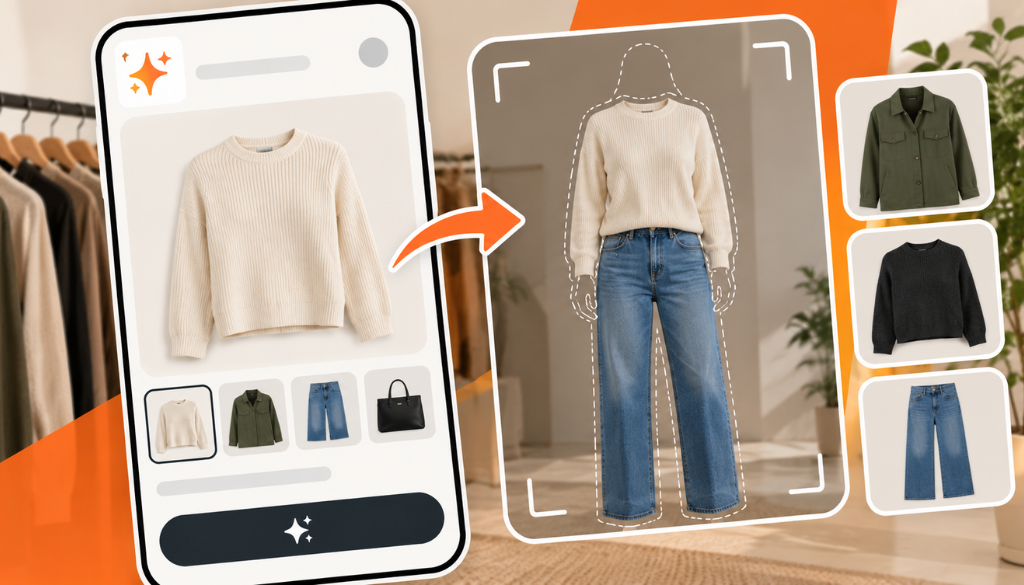
On October 1, 2026, OpenAI added a virtual “Try on” button for clothing and accessories and a Favorites library to ChatGPT shopping, available on mobile and web. Shoppers take or upload a selfie and ChatGPT Images generates an image of them wearing the item. The reference photo is saved for future try-ons and can be changed or deleted in Settings. OpenAI says the images do not guarantee fit or size.
Quick Summary
- OpenAI’s ChatGPT release notes list “New ways to shop in ChatGPT” on October 1, 2026: a Try on button for clothes and accessories, and Favorites.
- A “Try on” button appears on product listings for clothes and accessories. Shoppers take or upload a selfie, and ChatGPT Images generates the try-on image.
- Shoppers can also upload a picture of clothing or accessories in a conversation and ask ChatGPT to show how the item could look on them, so try-on is not limited to products ChatGPT surfaced itself.
- Reference photos are saved for future try-ons and can be changed or deleted under Settings → Personalization → Reference photos.
- OpenAI cautions that try-on images may not represent the product or the shopper exactly and do not guarantee fit or size.
OpenAI announced two new shopping features for ChatGPT on October 1, 2026, a virtual try-on for clothing and accessories and a Favorites library for saving products, according to its release notes and TechCrunch’s report. Both are available in ChatGPT on mobile and web, and both build on ChatGPT’s existing shopping results, which OpenAI’s help documentation says are selected independently by ChatGPT and are not ads.
How Does ChatGPT’s Virtual Try-On Work?
A “Try on” button appears on product listings for clothes and accessories in ChatGPT. According to OpenAI’s shopping help page, the try-on is created with ChatGPT Images, and the steps are:
- Select the “Try on” button on a product listing for clothes or accessories.
- Take or upload a selfie.
- View the generated try-on image.
Shoppers can also upload a picture of clothing or accessories in a conversation and ask ChatGPT to show how the item could look on them. Relevant Audience and TechCrunch both describe this as working with something like a screenshot from a retailer’s website, and TechCrunch notes that shoppers can use a full-body photo instead of a selfie.
What Happens to the Reference Photo?
ChatGPT saves the reference photo so shoppers do not have to upload it again for each try-on. OpenAI says shoppers can change or remove it in Settings: open Settings → Personalization → Reference photos, select the photo, then choose Change photo to replace it or the delete icon to remove it.
What Is the Favorites Feature?
Favorites lets shoppers save any product they find in ChatGPT, or create a folder to organize their finds, inside their ChatGPT Library. Shoppers save a product with its bookmark icon, and TechCrunch reports that saved items appear alongside try-on images. OpenAI’s help page says shoppers can browse their saved products and folders by returning to Library.
Which Model Powers Try-On?
Both features run on ChatGPT Images 2.5, according to TechCrunch’s report. OpenAI says the model improves lighting and textures, follows editing instructions more reliably, and reduces image generation latency. Those are OpenAI’s own claims, and neither OpenAI nor the coverage we reviewed published speed or quality measurements to check them against.
What Are the Limits of Virtual Try-On?
OpenAI is direct about the limits. Its help page says try-on images may not represent the product or your appearance exactly and do not guarantee fit or size, and tells shoppers to check the merchant’s measurements, product details, and return policy before buying.
The Try on button is also limited to product listings for clothes and accessories, so it does not apply to every category ChatGPT shows in shopping results.
How Do Products Get Into ChatGPT Shopping Results?
The Try on button appears on product listings that ChatGPT shows, so how a product gets into those results is the part brands can influence. OpenAI’s documentation says ChatGPT shows a product when it perceives the product as relevant to a shopper’s intent, considering the query and context such as Memory or Custom instructions. When it decides which products to surface, it considers structured metadata from first-party and third-party providers (such as price and product description), other third-party content, model responses generated before it considers any new search results, and OpenAI’s safety standards and product policies.
For merchants, OpenAI describes two routes. Merchants on Shopify already have product data in ChatGPT through Shopify Catalog, and OpenAI says no additional work is required from individual merchants. Merchants who want ChatGPT to always reflect up-to-date product information can read the Product Feed documentation and apply for direct feed access. When a shopper clicks a product, ChatGPT may show a list of merchants offering it, ranked on factors such as availability, price, quality, and whether the merchant is the maker or primary seller.
If you are working on any of this, our guides to how product pages get recommended by ChatGPT, Gemini, and Perplexity, writing product descriptions AI search engines understand, and AI shopping optimization cover the data and page structure behind those results. Product results are separate from paid placements, which we covered in our report on the latest ChatGPT Ads updates.
Why This Matters
Try-on moves ChatGPT further into the part of shopping that happens after a shopper has found something and before they decide to buy it. Google launched virtual try-on in July 2025 and extended it to work from a single selfie in December 2025, so OpenAI is joining a feature that shoppers can already use in Google Search, Shopping, and Images.
The timing fits the shopper behavior we have been tracking. NielsenIQ found that more than half of U.S. shoppers now use AI to shop, and each feature that keeps a shopper inside ChatGPT, from a try-on image to a saved Favorites folder, gives them more reasons to carry more of that journey there. Shopify’s integration with ChatGPT means many merchants are already in that flow.
For brands, the practical question is whether products in this category are present and well described in the sources ChatGPT draws on. Neither OpenAI’s release notes nor the coverage we reviewed mention merchant controls, reporting, or opt-out options specific to try-on, so what brands can see or influence beyond their product data is not yet clear.
Frequently Asked Questions
What is ChatGPT Try on?
Try on is a ChatGPT shopping feature that lets shoppers see how clothing and accessories could look on them. A Try on button appears on product listings for clothes and accessories, shoppers take or upload a selfie, and ChatGPT Images generates the image.
Where is ChatGPT virtual try-on available?
OpenAI says Try on and Favorites are available in ChatGPT on mobile and web. OpenAI’s release notes do not list a plan or region restriction, and TechCrunch describes it as a global launch.
Does ChatGPT try-on show how clothes will actually fit?
No. OpenAI says try-on images may not represent the product or the shopper’s appearance exactly and do not guarantee fit or size, and it recommends checking the merchant’s measurements, product details, and return policy before buying.
Can I delete the photo ChatGPT saves for try-ons?
Yes. Open Settings → Personalization → Reference photos, select the photo, and choose Change photo to replace it or the delete icon to remove it.
Does a product have to be listed in ChatGPT to be tried on?
Not necessarily. The Try on button appears on product listings in ChatGPT, but OpenAI also says shoppers can upload a picture of clothing or accessories in a conversation and ask ChatGPT to show how the item could look on them.
Sources: OpenAI ChatGPT Release Notes, OpenAI Help Center: Shopping with ChatGPT Search, TechCrunch, Relevant Audience, TechCrunch (Google try-on).
About the author
Kai Williams
Kai Williams has been in marketing for years, with a long background in SEO before AEO had a name. He stepped into Answer Engine Optimization the moment AI started reshaping how people search, and has been tracking the shift ever since. At Prompt Insider, he covers AEO, AI marketing, and the future of search, breaking down what is changing and what brands need to do about it.